
This quickstart guide will help you jumpstart your adventure on your The Isle server.
Launch Your Isle Server Today with AA Game Hosting
The Isle Beginner’s Quick Start Guide is designed to help new players jump into the world of survival, growth, and dinosaur gameplay with confidence. Whether you’re exploring the island for the first time or learning the basics of movement, survival, and progression, this guide walks you through the essentials you need to get started. From choosing your dinosaur to understanding core mechanics like diet, growth, and navigation, you’ll find everything you need to begin your journey and avoid the common pitfalls that catch new players off guard. By the time you finish, you’ll be ready to step into The Isle with a solid foundation and a clear path forward.
How to Configure Your The Isle Server
1. Log in to your Game Control Panel and navigate to your service.
2. Before making any modifications, stop the server from running by clicking the Stop button.

3. Navigate to the Configuration Files Tab to continue.
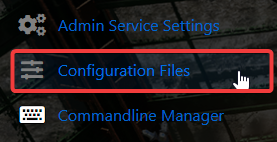
4. Under Configuration Files, look for TheIsle\Saved\Config\WindowsServer\Game.ini, then click either Config Editor or Text Editor to open it.

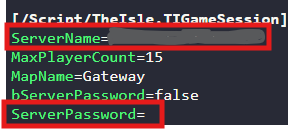
5. Set your Server Name and, if desired, create a Server Password. Leave the password field empty if you prefer the server to remain open.
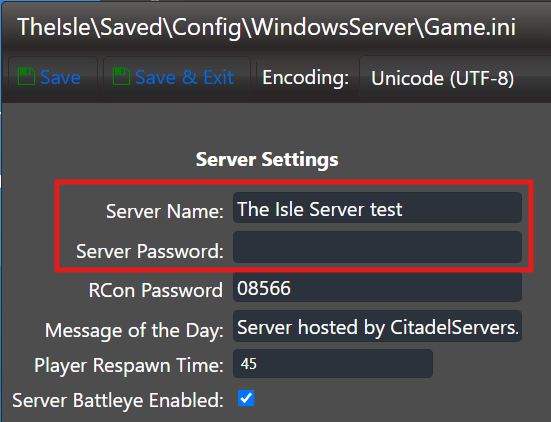
6. When you’re finished, click Save to ensure all adjustments are applied.

7. Navigate back to the Home page in your Game Panel and start the server from there.

How to Join on your The Isle Server
1. Start The Isle on your computer to continue with the setup.
2. At the main screen, choose Play to continue.
3. Search for your server using the available Filter Options.
4. Select Join to connect to your server.
Did the above information not work for you?
Please click here to contact our support via a ticket.
