
This guide will help you reset and Reinstall Your Wurm Unlimited Server
Start hosting your Wurm Unlimited world today with AA Game Hosting
Resetting and reinstalling your Wurm Unlimited server is one of the most reliable ways to fix persistent issues, clear corrupted data, or simply start fresh with a clean world. Whether you’re troubleshooting crashes, preparing for a new map, or wiping your server for a fresh season, performing a proper reset ensures that all files, databases, and configurations are rebuilt correctly. This introduction walks you through what a full reset involves, why it’s sometimes necessary, and what you should expect before beginning the reinstallation process. By following the steps carefully, you’ll restore your server to a stable, default state and be ready to configure it exactly the way you want.
Resetting and Reinstalling Your Wurm Unlimited Server
1. Log in to your Game Control Panel and navigate to your service.
2. Before making any modifications, stop the server from running by clicking the Stop button.

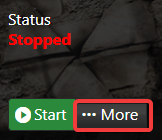
3. Select the More button positioned next to the Start/Stop buttons on your server’s home dashboard.
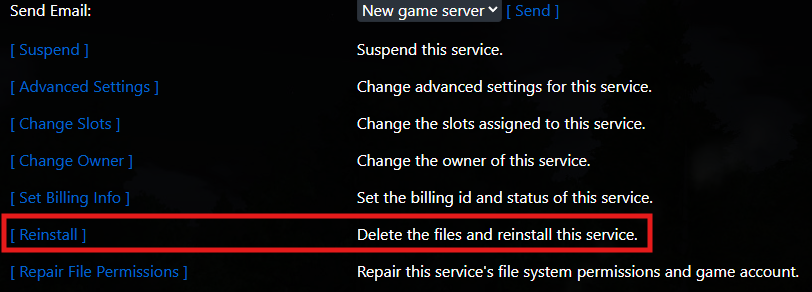
4. Locate the Reinstall button on this page and click it to reset your server back to default.
Did the above information not work for you?
Please click here to contact our support via a ticket.
