
This guide will help you set yourself up as a GM on your Wurm Unlimited Server
Start hosting your Wurm Unlimited world today with AA Game Hosting
Gaining GM access on your Wurm Unlimited server allows you to manage the world with full administrative control, spawning items, shaping terrain, managing players, and performing essential server‑side tasks that aren’t possible through normal gameplay. Whether you’re running a private server for friends or hosting a public world, setting yourself as a GM ensures you have the tools needed to maintain stability, enforce rules, and customize the experience exactly the way you want it. This guide walks you through the process of assigning GM permissions to your account, including locating the correct database, updating your player record, and applying the appropriate power level. By the end, your character will have full GM capabilities and immediate access to the in‑game management tools required to oversee your server effectively.
Configuring GM Accounts and Permissions in Wurm Unlimited
1. Log in to your Game Control Panel and navigate to your service.
2. Before making any modifications, stop the server from running by clicking the Stop button.

3. Navigate to the Player Editor Tab to continue.
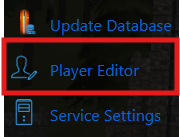
4. In the Player Editor, enter your character name with the correct capitalization. Wurm typically converts names to lowercase except for the first character, so double‑check the casing.
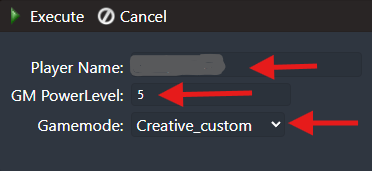
Choose the GM power level you want to apply to your account in the appropriate field.
GM Power Levels in Wurm Unlimited (1–5)
Wurm Unlimited uses five GM power tiers, each offering different levels of access and administrative ability. When assigning a GM level to your character, here’s what each tier provides:
• Tier 1 — HERO: A low‑level GM role with very limited abilities. HERO characters can move invisibly, teleport, and explore the world without interacting with players or objects. They cannot view character details or modify anything in the world. They can be given a Wand of Teleportation to help with movement.
• Tier 2 — GM: This is the standard Game Master role. Tier 2 and above can manage players directly: set CA/CM roles, move players, ban players, view player information, and perform general moderation tasks.
• Tier 3 — High God: Rarely used in Wurm Online and not commonly needed in Wurm Unlimited. Its additional abilities (if any) are minimal compared to Tier 2 and Tier 4.
• Tier 4 — Arch GM: A high‑level administrative role with full world‑editing capabilities. Arch GMs can spawn items, modify skills, shut down the server, and perform advanced management tasks. They are invisible even to normal GMs. Arch GMs receive an Ebony Wand in addition to the standard Ivory Wand, and in Wurm Online, they typically also have access to a Mission Ruler.
• Tier 5 — Implementor: The highest tier, used by developers in Wurm Online. Functionally very similar to Tier 4, with only minor differences. This level is rarely needed for private servers.
5. After editing the file, click the Execute button to apply the changes to your server before continuing.
For the best gameplay experience, create two characters, one with Tier 4/5 GM powers for server administration, and another with Tier 1/2 for playing normally. High‑tier GM characters bypass most gameplay mechanics, allowing instant actions and immunity from creature aggression, which removes much of Wurm’s challenge and progression.
Did the above information not work for you?
Please click here to contact our support via a ticket.
