
This guide will show you how to add BepInEx Mods to your V Rising Server
Order your V Rising server today with AA Game Hosting by clicking here!
Adding mods with BepInEx is one of the most effective ways to customize and enhance your V Rising server. Whether you want new gameplay features, quality‑of‑life improvements, or deeper control over server behavior, BepInEx serves as the foundation that makes most server‑side and client‑side mods possible. This guide will walk you through the full process of installing BepInEx mods on your V Rising server, ensuring everything is set up correctly so your players can enjoy a smooth and modded experience.
Installing BepInEx Mod on a V Rising Server
1. Log in to your Game Control Panel and navigate to your service.
2. Before making any modifications, stop the server from running by clicking the Stop button.

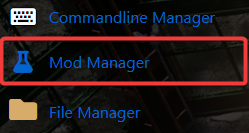
3. Navigate to the Mod Manager Tab to continue.
4. Install the BepInEx mod on your server.

5. Once BepInEx has finished installing, start your server. You can now upload and use server‑side mods.
Did the above information not work for you?
Please click here to contact our support via a ticket.
