

This guide will show you how to adjust the server timezone and PvP Activity Windows in your V Rising Server
Order your V Rising server today with AA Game Hosting by clicking here!
Configuring your server’s timezone and PvP activity windows is essential for creating a fair, predictable, and well‑structured gameplay environment in V Rising. These settings determine when PvP combat is allowed, how raid windows align with your community’s active hours, and how in‑game events sync with real‑world time. Whether you’re running a casual co‑op server or a competitive PvP realm, aligning these schedules with your player base ensures smoother coordination and a better overall experience. This guide walks you through how to adjust your server’s timezone and customize PvP activity windows. You’ll learn where to find these options, how each setting affects gameplay, and how to choose values that best match your server’s goals and community activity patterns.
Managing Timezone and PvP Schedule Settings on Your V Rising Server
1. Log in to your Game Control Panel and navigate to your service.
2. Before making any modifications, stop the server from running by clicking the Stop button.

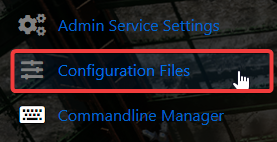
3. Navigate to the Configuration Files Tab to continue.
4. Locate the ServerGameSettings file in the Configuration Files and open it through the Text Editor.

5. Find the PlayerInteractionSettings and TimeZone entries and set their values to your desired crafting and building cost multipliers.

| Setting | Description |
|---|---|
| Local | Uses the server machine’s local time zone |
| UTC | Recommended universal time setting |
| PST | Pacific Standard Time (UTC -7) |
| EST | Eastern Standard Time (UTC -4) |
| CET | Central European Time (UTC +1) |
| CST | Chinese Standard Time (UTC +8) |
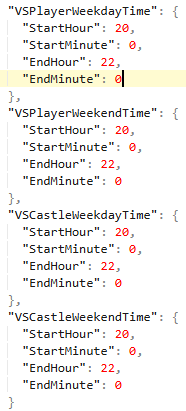
Define the time window for PvP and PvCastle Schedule:
| Setting | Description |
|---|---|
| VSPlayerWeekdayTime (Start/EndTimeData) | Defines when PvP damage is enabled during weekdays |
| VSPlayerWeekendTime (Start/EndTimeData) | Defines when PvP damage is enabled during weekends |
| VSCastleWeekdayTime (Start/EndTimeData) | Defines when castles can be destroyed on weekdays |
| VSCastleWeekendTime (Start/EndTimeData) | Defines when castles can be destroyed on weekends |
6. When you’re finished configuring the difficulty, click the Save button to commit the changes to your server.

Did the above information not work for you?
Please click here to contact our support via a ticket.
