

This guide will show you how to Configure Resource Gather Rates and Stack Limits in your V Rising Server
Order your V Rising server today with AA Game Hosting by clicking here!
Fine‑tuning gather rates and stack limits is one of the most effective ways to shape progression, pacing, and overall resource flow on your V Rising server. Whether you want faster early‑game advancement, a more challenging survival experience, or simply less inventory micromanagement, adjusting these settings gives you precise control over how players collect and store materials. This guide will walk you through configuring resource gather rates and item stack limits on your V Rising server. You’ll learn where to find the relevant settings, what each option changes in‑game, and how different values can impact balance, progression, and player experience.
Customizing Gather Rate and Stack Size Settings on Your V Rising Server
1. Log in to your Game Control Panel and navigate to your service.
2. Before making any modifications, stop the server from running by clicking the Stop button.

3. Navigate to the Configuration Files Tab to continue.
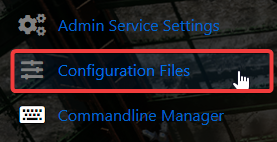
4. Locate the ServerGameSettings file in the Configuration Files and open it through the Text Editor.

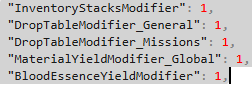
5. Find the Gathering Resources and Stack Settings entries and set their values to your desired rates
 .
.
| Setting | Description | Example |
|---|---|---|
| InventoryStacksModifier | Increases item stack limits. | 2.0 |
| DropTableModifier_General | Boosts general loot drops. | 2.0 |
| DropTableModifier_Missions | Boosts mission rewards. | 2.0 |
| MaterialYieldModifier_Global | Boosts gathered resources. | 2.0 |
| BloodEssenceYieldModifier | Boosts Blood Essence gains. | 2.0 |
6. When you’re finished configuring the difficulty, click the Save button to commit the changes to your server.

Did the above information not work for you?
Please click here to contact our support via a ticket.
