
 This guide will help you How to Update Your Windrose Server
Experience Windrose Hosting — Order from AA Game Hosting!
Updating your Windrose server isn’t just routine maintenance. It’s how you keep your world stable, secure, and ready for whatever you build next. A smooth update ensures your plugins stay compatible, your performance stays sharp, and your players avoid the headaches that come from running outdated builds. Whether you're hosting a small private world or managing a large community, understanding the update process gives you control and confidence. At its core, the update process comes down to three things: preparing your environment, installing the latest Windrose build, and verifying that everything runs cleanly afterward. This guide walks you through each step so you can update safely, avoid common pitfalls, and keep your server running at its best. If you’re new to server management, don’t worry, the workflow is straightforward, and by the end, you’ll know exactly how to handle future updates with ease.
Updating Your Windrose Server
1. Log in to your Game Panel to begin the setup.
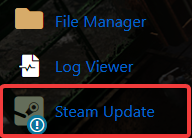
2. Go to the Steam Update section to continue.
3. A separate console will open, allowing you to monitor the update as it runs.

When the update finishes, you can safely start the server.
If you encountered issues during the process,
Please click here to send a ticket to our team.
