
 This guide will help you join your Windrose Server.
Experience Windrose Hosting — Order from AA Game Hosting!
Getting connected to your Windrose server is the first step toward exploring everything your world has to offer. Whether you're setting up a fresh server for friends or joining an existing community, the process is simple once you know where to start. This guide walks you through each step so you can jump in quickly, avoid common setup issues, and get straight to enjoying your Windrose experience. No matter your level of technical comfort, you’ll be ready to join your server with confidence.
How to Join Your Windrose Server in Minutes
Method 1: Join Your Server Using an Invite Code
1. Open our guide to set up your Server Invite Code.
2. Open the game, go to “Connect to Server,” and paste your Invite Code to join.
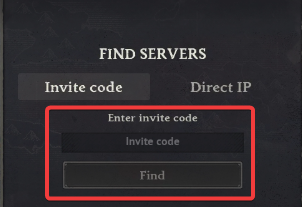
Then click "Find" at the bottom to complete the connection.
Method 2: Fast Connect with Direct Connect
1. Log in to your Game Panel to begin the setup.
2. Copy the IP and Port details from your server panel.
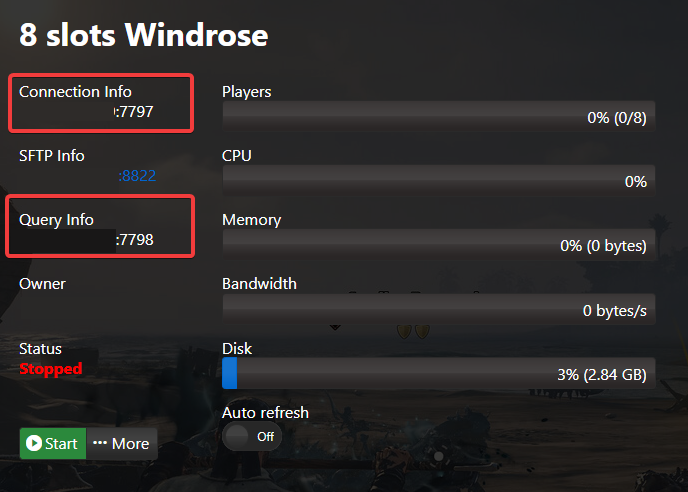
3. Launch the game, choose “Connect to Server,” then tap the “Direct IP” section that appears at the top.
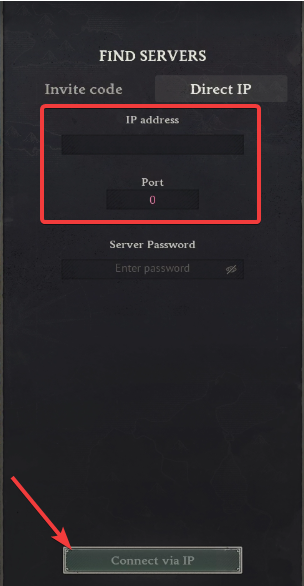
Choose “Connect via IP” at the bottom to complete the connection.
If you encountered issues during the process,
Please click here to send a ticket to our team.
