
 This guide will help you How to Set Up Your Windrose Server Invite Code
Experience Windrose Hosting — Order from AA Game Hosting!
Setting up your Windrose Server Invite Code is the easiest way to let players join your world without needing to share technical details like IP addresses or ports. Whether you're hosting a private server for friends or preparing a community space, the Invite Code system keeps the process simple, secure, and user‑friendly. This guide walks you through each step of generating and managing your Invite Code so you can get your server ready for players quickly and confidently. By the end, you’ll have everything you need to share access and start building your Windrose adventure together.
How to Use Your Invite Code
Log in to your Game Panel to begin the setup.
2. Go to the Configuration Files section to continue.
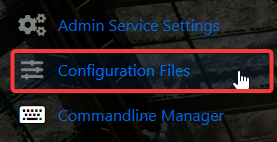
3. Select “Text Editor” to access the file and make changes to the invite code.
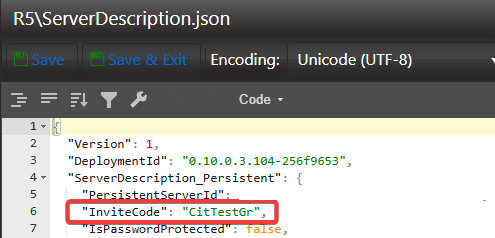
Click “Save,” then start the server to load the new invite code.
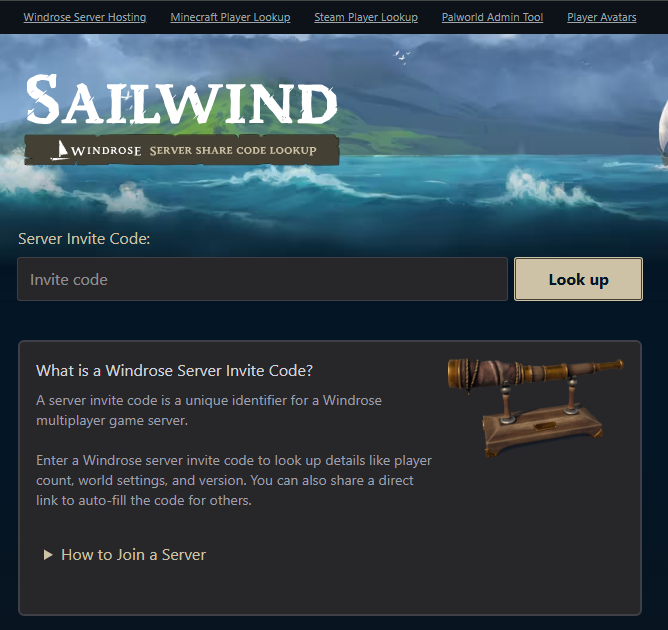
4. Use the Sailwind.codes site to verify your invite code. It may take a short while for updates to sync.
If you encountered issues during the process,
Please click here to send a ticket to our team.
