
This guide will help you on How to Change Your Warband Server Name
Click here to order your Mount & Blade: Warband server with AA Game Hosting today!
Changing your Mount & Blade: Warband server name is one of the simplest ways to refresh your server’s identity, attract new players, or better reflect your community’s theme. Whether you’re running a dedicated server for friends or hosting a public battlefield, updating the name helps keep things organized and recognizable in the server browser. This guide walks you through the process step by step, showing exactly where to find the configuration file, what to edit, and how to apply the changes so your new server name appears correctly in‑game.
Changing the Server Name on your Mount & Blade: Warband
Log in to your Game Control Panel.
Open the Configuration Files tab. Depending on the current mode you installed, select "Text Editor" to open the config of that mode. Find the "set_server_name" field, and then simply input your desired name.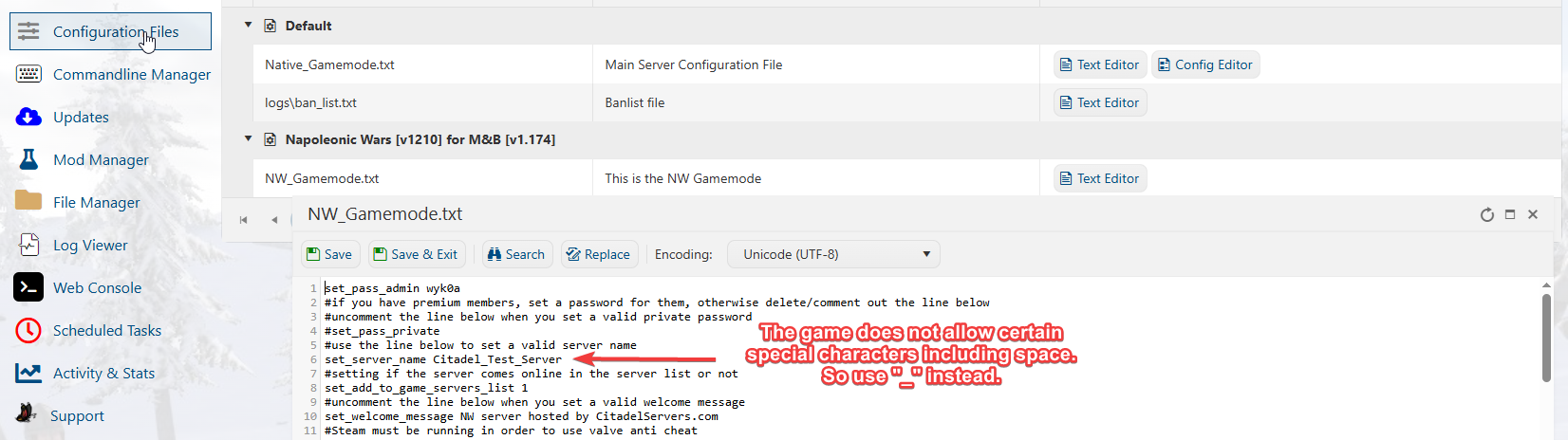
Please do note that the game does not accept all "Special Characters", including spaces, so please change the name of your servers if it contains them and are not showing in the list.
Press "Save" when done, and then you can join your server with the passwords once you start it.
If you encountered issues during the process,
Please click here to send a ticket to our team.
