

This quickstart will help you jumpstart your adventure on your Mount&Blade Warband Server.
Click here to order your Mount & Blade: Warband server with AA Game Hosting today!
Running a Mount & Blade: Warband server means taking charge of your own corner of Calradia, managing players, enforcing rules, and keeping your server stable and secure. This Server & Admin Password Guide explains how Warband’s server authentication works, how to configure your admin password safely, and how to set up the server password that controls who can join your game. Warband’s dedicated server tools are powerful but not always intuitive. New hosts often struggle with the difference between server access and admin privileges, how to protect their server from unwanted changes, or how to prevent unauthorized players from taking control of admin commands. This guide breaks down each step clearly, configuring passwords, editing server files, and using in‑game admin controls so you can run your server confidently from day one. Whether you're hosting a small private match for friends or building a public community hub, understanding Warband’s password and admin systems is the key to keeping your server organized, secure, and enjoyable for everyone.
Configuring Server and Admin Password on my Mount & Blade: Warband Server
Log in to your Game Panel.
Open the Configuration Files tab. Depending on the current mode you installed, select
"Text Editor" to open the config of that mode. Find the
"set_pass_admin" and "set_pass_private" fields, and then simply input your desired password.
Admin being for admin privileges, and the private one for the actual server password.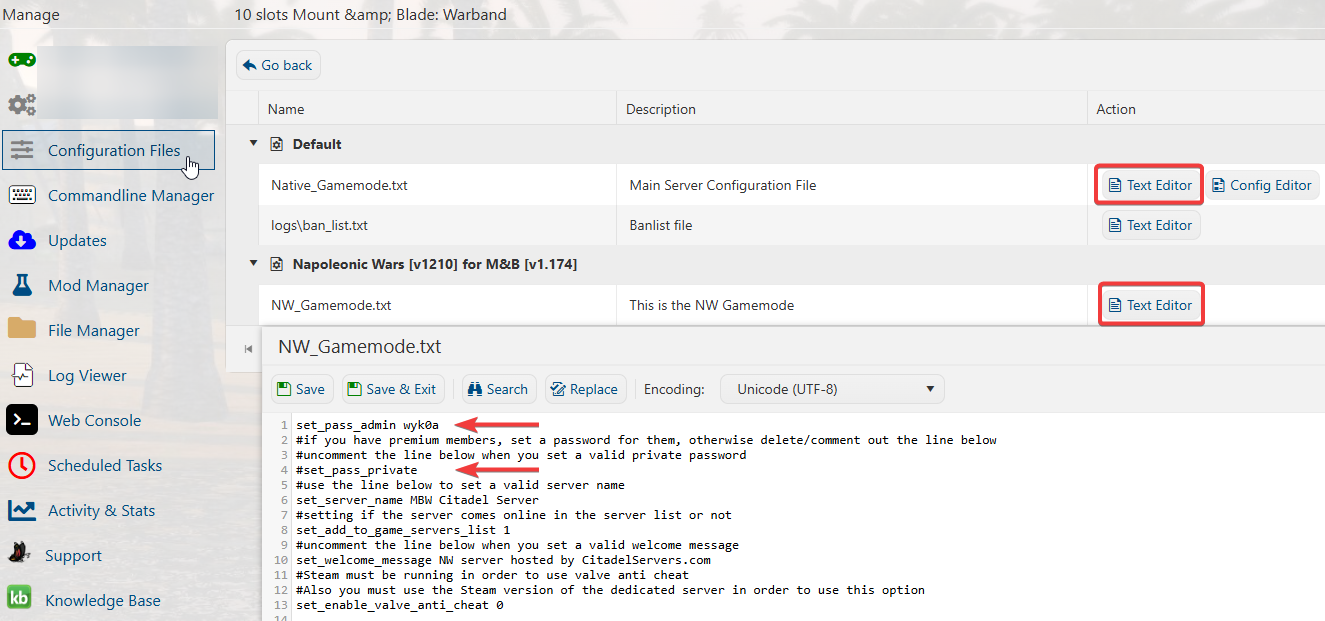
Press "Save" when done, and then you can join your server with the passwords once you start it.
If you encountered issues during the process,
Please click here to send a ticket to our team.
