

This guide will help you on how to stop lua errors on your Garry's Mod server.
Click here to order your Garry's Mod server with AA Game Hosting today!
Running a Garry’s Mod server with custom addons and scripts can be incredibly rewarding, but it also comes with challenges. One of the most common frustrations server owners face is the appearance of Lua errors. These errors usually pop up when an addon is outdated, misconfigured, or incompatible with other scripts. While Lua errors don’t always mean your server is broken, they can clutter the screen, confuse players, and make your server look unpolished. Fortunately, there are straightforward steps you can take to stop these error messages from showing up. It’s important to note that stopping Lua errors doesn’t necessarily fix the underlying issue it simply prevents the error messages from appearing on players’ screens. This makes gameplay smoother and less distracting, while you troubleshoot or wait for addon updates.
Stopping Lua Errors on your Garry's Mod Server
1. Log in to your Game Control Panel and navigate to your service.
2. Before making any modifications, stop the server from running by clicking the Stop button.

3. Navigate to Configuration Files.
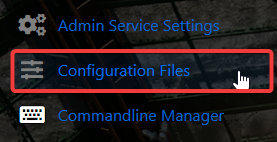
4. On the Configuration Files, look for garrysmod\cfg\server.cfg and click the Text Editor.

5. On the Text Editor, you will need to add this command:
sv_kickerrornum 0

6. After editing, click the Save button to apply the changes on your server.

7. Once done, make sure to restart your server, and errors will no longer plague the screen.
Did the above information not work for you?
Please click here to contact our support via a ticket.
