
This guide will help you on how to setup Fast Download (Fast DL) on your Garry's Mod server.
Click here to order your Garry's Mod server with AA Game Hosting today!
Running a Garry’s Mod server often means adding custom maps, models, sounds, or textures to make gameplay more engaging. However, without a proper system in place, players may face long download times or even fail to connect due to missing files. This is where FastDL (Fast Download) comes in. FastDL is essentially an external web server that hosts all your custom content. Instead of forcing players to download files directly from the game server (which can be slow and resource-heavy), FastDL delivers these files through a dedicated HTTP server. By setting up FastDL, you’re not just improving performance you’re also creating a more welcoming environment for players who want to jump straight into the action without frustrating delays.
Setting up Fast Downloads (Fast DL) on your Garry's Mod Server
1. Log in to your Game Control Panel and navigate to your service.
2. Before making any modifications, stop the server from running by clicking the Stop button.

3. Navigate to Fast Download Sync.
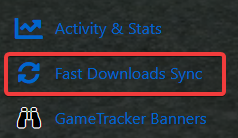
4. This will run and sync the Fast Download tool on your server. It will let you know once the syncing is done.

Congratulations, you have set up Fast DL!
Did the above information not work for you?
Please click here to contact our support via a ticket.
