

This guide will help you on how to add admins on your Garry's Mod server.
Click here to order your Garry's Mod server with AA Game Hosting today!
Running a Garry’s Mod server isn’t just about hosting fun game modes it’s also about keeping the community safe, organized, and enjoyable for everyone. One of the most important steps in server management is assigning admins, trusted players who can help enforce rules, manage gameplay, and assist other users when needed. Adding admins ensures that you don’t have to handle everything alone. With the right permissions in place, admins can kick or ban disruptive players, change maps, and oversee server activity, giving your community a smoother and more enjoyable experience. In this guide, we’ll walk you through the process of adding admins to your Garry’s Mod server, explain the tools you’ll need, and share best practices for choosing the right people for the role. Whether you’re running a small private server or a large public community, setting up admins properly is a key step toward building a well-managed and welcoming environment.
Adding Admins on your Garry's Mod Server
1. Log in to your Game Control Panel and navigate to your service.
2. Before making any modifications, stop the server from running by clicking the Stop button.

3. Go to the Configuration Files Tab.
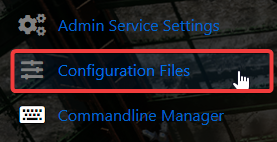
4. On the Configuration Files, look for garrysmod/settings/users.txt and click Text Editor.

5. On the Text Editor, Start a new line or look for the comment lines ( // ) behind "garry" and remove them to make the line usable. Make sure the name is in quotation marks. You can use anything or leave it empty, because the only factor here is the Steam ID, you must able to get it first. Have a space after the quotes and insert your Steam ID into a quote as well. This should make you an admin or a superadmin depending on which array you've chosen.
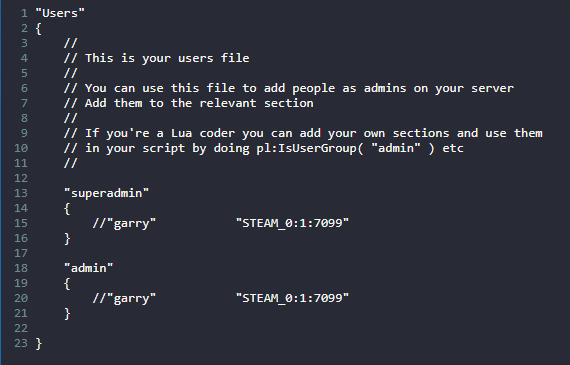
6. After editing, click the Save button to apply the changes on your server.

Did the above information not work for you?
Please click here to contact our support via a ticket.
