

This guide will help you with how to Enable Crossplay on your Ark: Survival Ascended Server
Enabling crossplay on your Ark: Survival Ascended server allows players from different platforms to join the same world, making your community more accessible and unified. Whether your group plays on Steam, Xbox, PlayStation, or a mix of all three, activating crossplay ensures everyone can explore, build, and survive together without platform restrictions. Because ASA relies on specific configuration settings and platform‑compatible server parameters, enabling crossplay correctly is essential for smooth connections and stable gameplay. This guide walks you through the steps to enable crossplay on your server, covering the required settings, where to enable them, and how to verify that players from all supported platforms can join successfully. By the end, your server will be fully prepared for cross‑platform play.
Enabling Crossplay on your ARK: Survival Ascended Server
1. Log in to your Game Control Panel and navigate to your service.
2. Before making any modifications, stop the server from running by clicking the Stop button.

3. Navigate to the Commandline Manager Tab.

4. Select the Default ARK commandline, or the Modded commandline if your server uses mods, then click Modify.
5. Locate the Crossplay option. If you’re enabling multiple platforms, you can select Crossplay for All to allow every supported platform to join your server.
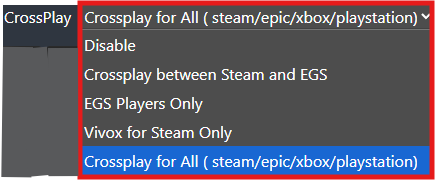
6. After editing, click the Apply button to save the changes on the server.

7. Start your server, and once it’s online, players on all enabled platforms will be able to see it in their server browser.

Did the above information not work for you?
Please click here to contact our support via a ticket.
