

This guide will help you on how to restore backup on your ARK Survival Ascended Server.
Running your own ARK: Survival Ascended server gives you full control over how players experience your world. Two of the most important customization options are your server name the identity that players see when browsing servers and your server password, which determines who can join. Whether you’re hosting a private adventure for friends or building a public community, adjusting these settings ensures your server is both recognizable and secure. Changing the server name allows you to brand your world with a unique identity, making it easier for players to find and remember. Meanwhile, setting or updating the password gives you control over access, preventing unwanted guests and keeping gameplay balanced. These adjustments are quick to make, but they play a big role in shaping the kind of environment you want to create. By the end, you’ll be able to confidently customize your ARK server’s name and password, ensuring your community has the right mix of accessibility and protection.
Changing the Server Name and Password on your ARK: Survival Ascended Server
1. Log in to your Game Control Panel and navigate to your service.
2. Before making any modifications, stop the server from running by clicking the Stop button.

3. Navigate to Configuration Files Tab.
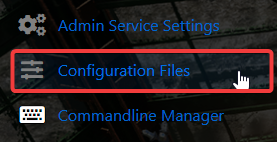
4. On the Configuration Files, look for GameUserSettings.ini file and click the Config Editor.

5. On the Config Editor, A pop-up will appear, you can change the Server Name and Password.
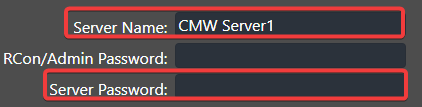
6. After editing, click Save to apply the changes.

You can also use the Text Editor Button to edit the original Config File. This can allow you to add any custom commands you wish to the configs.
Did the above information not work for you?
Please click here to contact our support via a ticket.
