

This quick guide shows you how to Play Without Enemies on your The Forest Server
Click here to order your The Forest server with AA Game Hosting today!
Playing The Forest without enemies offers a completely different kind of experience, one focused on exploration, building, and creativity rather than constant survival pressure. By disabling enemy spawns on your server, you can create a peaceful environment perfect for large‑scale base building, relaxed co‑op sessions, or newcomers who want to learn the game’s mechanics without the threat of cannibals or mutants. Adjusting this setting gives you full control over the atmosphere of your world, allowing you to tailor the game to the exact style of play you and your group prefer.
Disabling Enemies on Your The Forest Server
1. Log in to your Game Control Panel and navigate to your service.
2. Before making any modifications, stop the server from running by clicking the Stop button.

3. Navigate to the Configuration Files Tab to continue.
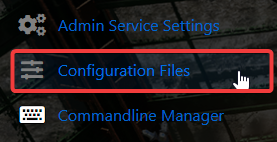
4. Go to the Configuration tab, find the server.cfg, and click the Text Editor to access its settings.

5. Within the Text Editor, find the No Enemies and No Enemies During Daytime settings and change their values to ON to activate them.
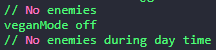
6. When you’re finished, click Save to ensure all adjustments are applied.

Did the above information not work for you?
Please click here to contact our support via a ticket.
