

This quick guide shows you how to Customize Difficulty on your The Forest Server
Click here to order your The Forest server with AA Game Hosting today!
Customizing the difficulty on your The Forest server lets you shape the exact survival experience you want your players to face. Whether you’re aiming for a brutal, high‑pressure world filled with aggressive cannibals or a more relaxed environment focused on exploration and building, adjusting difficulty settings gives you full control over how intense the game feels. By learning how these settings work and where to change them, you can fine‑tune enemy behavior, resource scarcity, and overall challenge to match your community’s preferred playstyle. This introduction sets the stage for a guide that walks you through each option so you can craft the perfect balance of tension, danger, and fun on your server.
Adjusting Difficulty Settings on Your The Forest Server
1. Log in to your Game Control Panel and navigate to your service.
2. Before making any modifications, stop the server from running by clicking the Stop button.

3. Navigate to the Configuration Files Tab to continue.
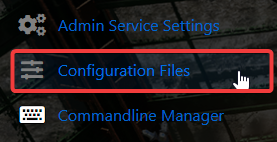
4. Go to the Configuration tab, find server.cfg, and click the Config Editor to access its settings.

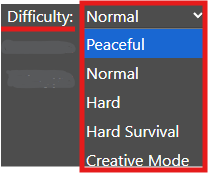
5. Within the Config Editor, find the Difficulty field and change it based on the level you want.
6. When you’re finished, click Save to ensure all adjustments are applied.

If you want to modify the server name through the file itself, select the Text Editor next to the Config Editor and apply your updates.

This way, all custom modifications you’ve applied, including mods and custom scenarios, remain intact and aren’t affected by the Config Editor preset.
Did the above information not work for you?
Please click here to contact our support via a ticket.
