
This guide will help you with how to join your own TF2 Server
Buy Your Team Fortress 2 Server Today and Start Playing Immediately
Running your own Team Fortress 2 server gives you full control over maps, mods, rules, and the overall gameplay experience, but before you can start customizing or inviting friends, you need to know how to connect to it yourself. Whether you’re hosting a private server for testing or preparing a public server for players, joining your TF2 server is a simple process once you know where to look. This guide walks you through each connection method, explains what information you’ll need, and helps you troubleshoot common issues so you can get into your server quickly and start configuring it exactly the way you want.
Connecting to Your Team Fortress 2 Server
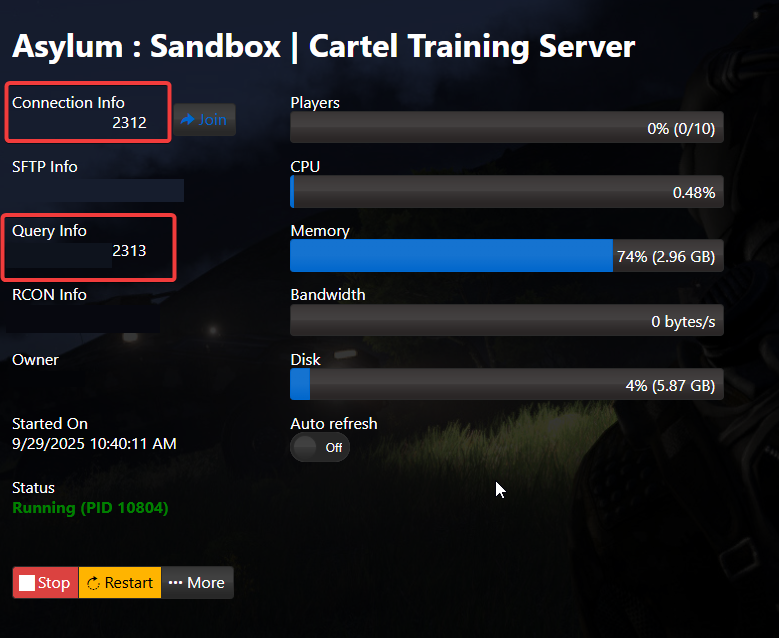
1. Log in to your Game Control Panel and navigate to your service.
2. Find the IP:Port in your Game Panel, then paste it into the field below.
3. Launch the Team Fortress 2 game client on your local machine.
4. Open the console by pressing the (`) key (located directly below the Esc key).
5. Enter the connect command, paste your Connection Info after it, and click Submit.
It should look like:
connect 192.168.15.11:7797
Did the above information not work for you?
Please click here to contact our support via a ticket.
