
This guide will help you How to Adjust the Game Mode on a Subnautica Nitrox Server
Order Your Subnautica Server Now and Start Exploring Instantly
Changing the game mode on your Subnautica Nitrox server lets you tailor the experience to match how you and your players want to explore the world, whether that means a relaxed Creative playthrough, a balanced Survival run, or a more challenging Hardcore environment. Because Nitrox uses its own server‑side configuration files, adjusting the game mode isn’t done in‑game but through your server settings. This guide walks you through exactly where to find those options and how to update them safely, ensuring your server loads with the correct mode every time.
Changing the Game Mode on Your Subnautica Nitrox Server
1. Log in to your Game Control Panel and navigate to your service.
2. Before making any modifications, stop the server from running by clicking the Stop button.

3. Navigate to the Configuration Files Tab to continue.
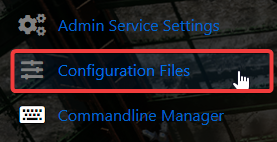
4. From the Configuration Files tab, open the main server configuration file using the Config Editor.

5. Go to Game Settings, find the Game Mode setting, and pick your preferred mode from the drop‑down menu.
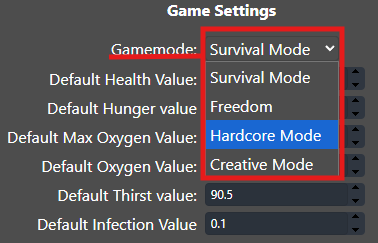
6. Click Save to update the configuration, and then launch your server.

Did the above information not work for you?
Please click here to contact our support via a ticket.
