
This guide will help you How to Stop Subnautica from Always Starting a New Save
Order Your Subnautica Server Now and Start Exploring Instantly
When Subnautica keeps creating a brand‑new save every time you launch the game, it can be frustrating, especially if you’re trying to continue an existing world or join a multiplayer Nitrox server. This issue usually comes down to problems with save‑file permissions, corrupted folders, or mismatched game versions that prevent Subnautica from loading your existing data correctly. In this guide, you’ll learn the most common causes of the problem and the exact steps to stop Subnautica from always starting a new save, so you can get back to exploring your original world without interruptions.
Fixing the Issue Where Subnautica Always Creates a New World
If your server repeatedly starts a new world, or if the error below appears:

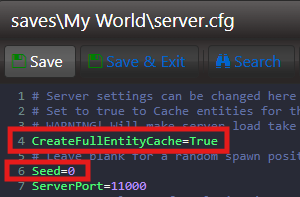
Set CreateFullEntityCache to True, and confirm that your world has a valid seed.
Go to your server’s Configuration Files and select the Text Editor for server.cfg to make the changes.

Search for CreateFullEntityCache=False, change it to True, and make sure the Seed= parameter is defined.
Did the above information not work for you?
Please click here to contact our support via a ticket.
