
This guide will help you add and configure the Carbon Mod on your Rust Server
Click here to order your RUST server with AA Game Hosting today!
The Carbon Mod is a powerful, modern server‑modding framework designed to enhance Rust gameplay with improved performance, modular plugin support, and advanced administrative tools. Whether you're running a small private server or managing a large community, Carbon provides a flexible foundation that makes customization easier and more efficient than traditional modding solutions. This guide walks you through the full process of installing and configuring Carbon on your Rust server, ensuring you have everything set up correctly from the start. By the end, you’ll be ready to add plugins, adjust settings, and tailor your server to deliver the exact experience you want for your players.
Installing Carbon Mod on Your Rust Server
Step 1:
Log in to your Game Panel and click Stop on your service. We suggest you save your server in-game first. (This is very important)
Step 2:
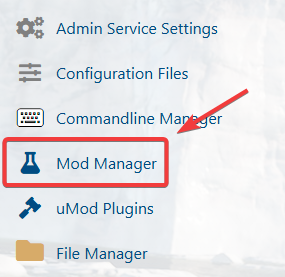
Click 'Mod Manager' from the icon menu.
Step 3:
Install the Carbon Framework.

Step 4:
Once the Carbon Framework is installed, you can now add your choice of plugins.
If you encountered issues during the process,
Please click here to send a ticket to our team.
