
This guide will show you how to Manually Perform a Soft Reset on your Project Zomboid Server
Click here to order your Project Zomboid server with AA Game Hosting.
Over time, every Project Zomboid server starts to accumulate clutter, abandoned bases, broken vehicles, scattered loot, and remnants of old player activity. When the world begins to feel messy, or performance starts to dip, a soft reset is one of the most effective ways to refresh your server without wiping everything your players have built. Unlike a full reset, a soft reset preserves characters, skills, safehouses, and most player progress while regenerating the world’s loot, zombies, and map data. Manually performing a soft reset gives you full control over the process, ensuring it’s done cleanly and safely, especially if you’re running a hosted server or managing custom configurations. This guide walks you through each step of the manual soft reset process so you can restore your world’s balance, improve performance, and keep your community’s progress intact.
1. Log in to your Game Control Panel.
Turn off the server before proceeding.
2. Open the File Manager and navigate to the save location in
"<Home>/Zomboid/Saves/Multiplayer"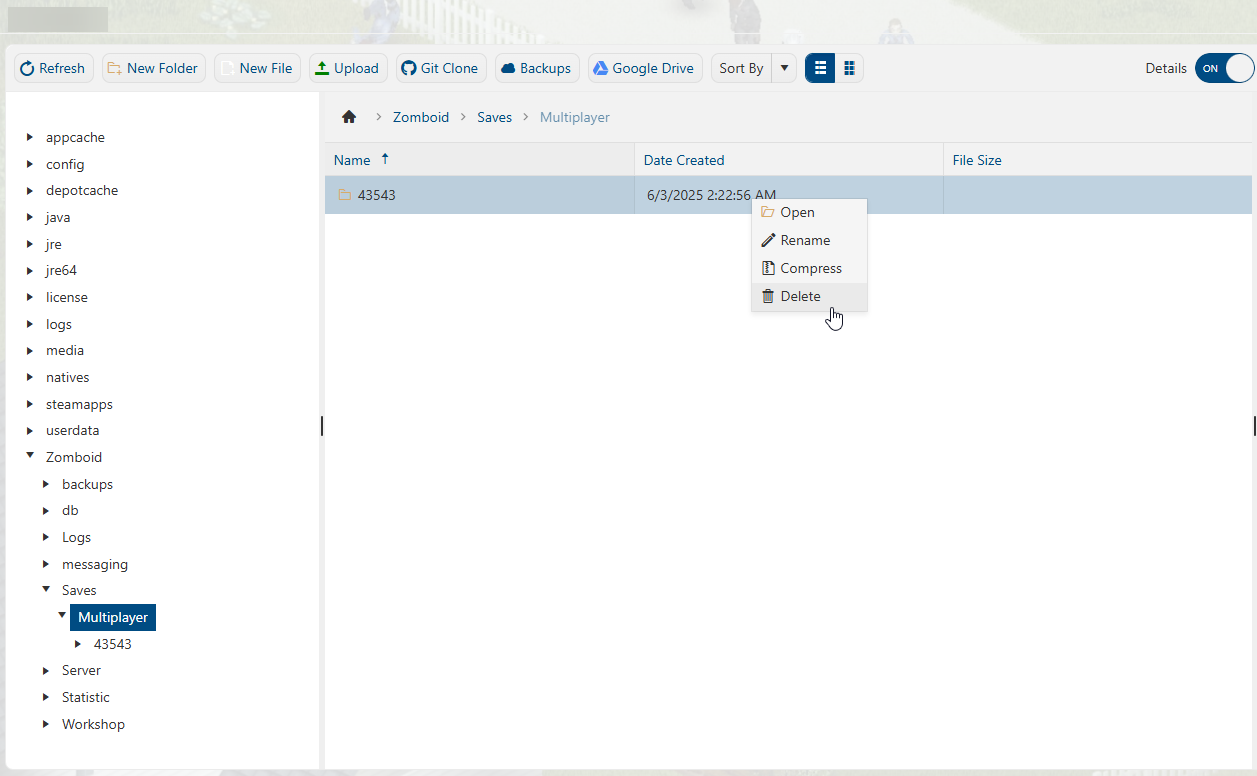
3. Select your world, right-click, and delete the saved folder.
4. Once deleted and the server is restarted, the server will generate a new world that will be affected by your installed mods.
Please click here to send a ticket to our team.
