This guide will teach you about Palworld Administrator Commands
Don't have a Palworld Server yet? Order one with AA Game Hosting today!
In the multiplayer survival world of Palworld, server management plays a crucial role in shaping the player experience. Whether you're hosting a private server for friends or managing a large community, administrator commands give you the power to control gameplay, enforce rules, and customize the environment. Palworld administrator commands are special console inputs that allow server admins to perform tasks such as spawning items, managing players, adjusting server settings, and resolving issues in real time. These commands help maintain balance, prevent abuse, and ensure smooth gameplay without needing to restart or manually edit server files. Understanding how to use these commands effectively can transform a basic server into a well-managed, dynamic world. In this guide, we’ll explore the essential administrator commands in Palworld and how they can enhance your control over the game.
Here is a complete list of Administrator commands for Palworlds.
| /Shutdown {Seconds} {MessageText} |
The server is shut down after the number of Seconds. You will be notified of your MessageText. |
| /DoExit | Force-stop the server. |
| /Broadcast {MessageText} | Send a message to all players in the server. |
| /KickPlayer {SteamID} | Kick the player from the server. |
| /BanPlayer {SteamID} | Ban the player from the server. |
| /TeleportToPlayer {SteamID} | Teleport to the current location of the target player. |
| /TeleportToMe {SteamID} | Target player teleports to your current location |
| /ShowPlayers | Show information on all connected players. |
| /Info | Show server information. |
| /Save | Save the world data. |
All these commands, except the /Teleport commands, can also be used via the Web Console in your game panel.
You just have to input the commands without "/" in your game panel's Web Console, e.g. DoExit
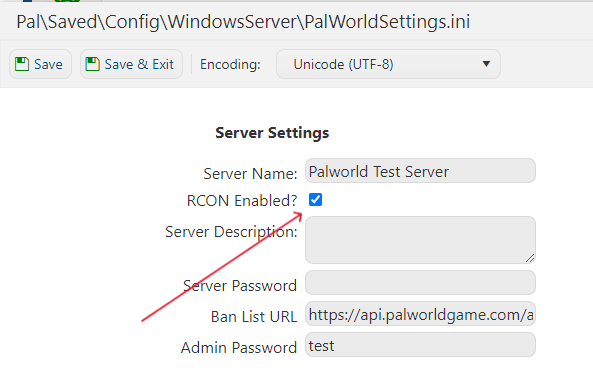
Note: Make sure you have enabled RCON inside the configuration file ( set to true )