

This guide will help you with the basic server configurations on your Insurgency Standalone Server
Click here to order your Insurgency Standalone server with AA Game Hosting today!
Running an Insurgency standalone server is one of the best ways to create a stable, customizable environment for your community or friends. Whether you’re hosting competitive matches, cooperative missions, or simply experimenting with mods, understanding the basic server configurations is the foundation of smooth gameplay and reliable performance. By mastering these basics, you’ll be able to tailor your Insurgency server to fit your vision, whether that’s a hardcore tactical experience, a casual co-op hub, or a competitive scrim environment. This introduction sets the stage for diving deeper into each configuration option, ensuring your server runs efficiently and delivers the gameplay experience you want.
Basic Server Configurations on your Insurgency Standalone Server
1. Log in to your Game Control Panel and navigate to your service.
2. Before making any modifications, stop the server from running by clicking the Stop button.

3. Navigate to the Configuration Files Tab.
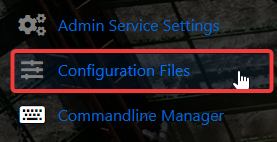
You have two methods for this:
Via the Config Editor (We recommend this if you only want to edit basic settings)
Via the Text Editor
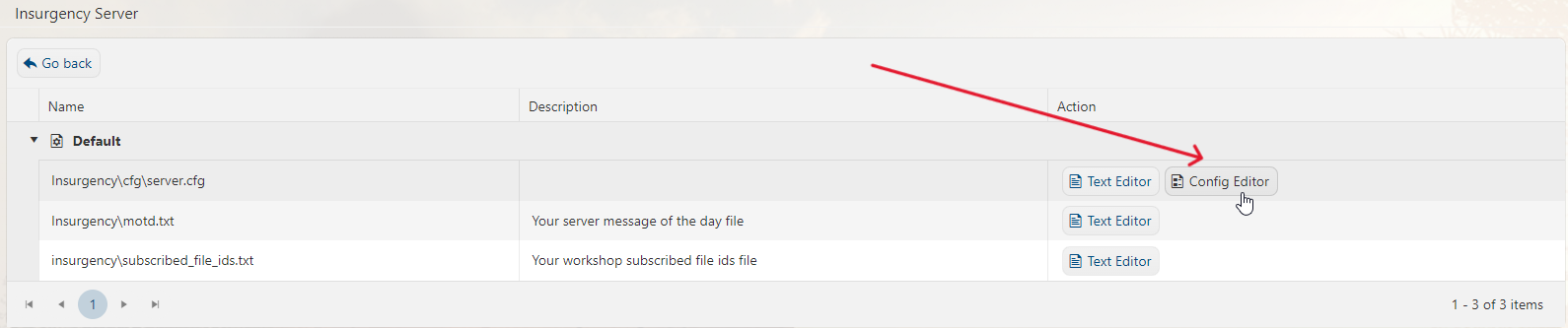
4. On the Configurations Files tab, look for server.cfg, then click the Config Editor.
5. On the Config Editor, you will find some of the basic server configuration. We recommend this as it is easier to configure.
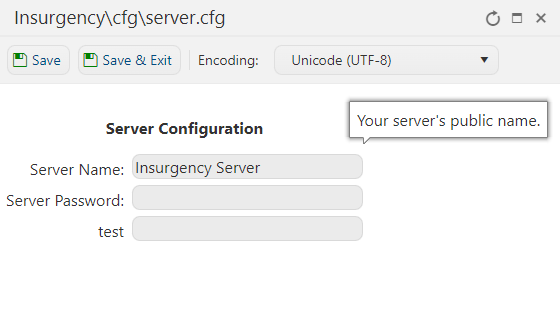
6. After editing, click the Save button to apply the changes on the server.

7. If you wanted a little bit more server configurations, click the Text Editor.

8. Kindly check this sample configuration that we've made for your reference. You can configure any of the settings below based on your preferences.
hostname "My Insurgency Server" // server name
rcon_password "<YourRemoteAdminPassword>" // rcon password
sv_password "" // Server password for private servers
sv_minrate 20000 // recommended minimum rate
// ---------------------------------------------------------------
log on // enables/disables server logging, it will store all text that the console prints into TXT files
sv_logbans 1
sv_logecho 1
sv_logfile 1
sv_log_onefile 0
// Game Mode Options (Change text within the quotes)
// ---------------------------------------------------------------
// "mapcycle.txt" - by default, this contains the most popular options
// "mapcycle_all.txt" - all possible map/mode combinations for PvP
// "mapcycle_ambush.txt" - only ambush (VIP) mode
// "mapcycle_attackdefend.txt" - mix of attack/defend modes
// "mapcycle_cooperative.txt" - checkpoint, outpost, hunt
// "mapcycle_firefight.txt" - all firefight maps
// "mapcycle_flashpoint.txt" - all flashpoint maps
// "mapcycle_infiltrate.txt" - all infiltrate (CTF) maps
// "mapcycle_objrespawn.txt" - all modes featuring respawning for completing objectives
// "mapcycle_occupy.txt" - all occupy maps
// "mapcycle_push.txt" - all push maps
// "mapcycle_singlelife.txt" - mix of all single life modes
// "mapcycle_skirmish.txt" - all skirmish maps
// "mapcycle_workshop.txt" - used by Workshop system
mapcyclefile "mapcycle.txt."
Did the above information not work for you?
Please click here to contact our support via a ticket.
