
 This guide will help you on How To Set Yourself As Superadmin on your FiveM Server.
Managing a FiveM server means having control over permissions, resources, and player actions. One of the most important roles you can assign is Superadmin, the highest level of administrative access. Setting yourself as Superadmin ensures you have full authority to configure the server, manage players, and troubleshoot issues without restrictions. By setting yourself as Superadmin, you establish a secure foundation for running your FiveM server smoothly. It’s the first step toward building a stable, well-managed community where you can enforce rules, customize gameplay, and keep everything under control.
Setting Yourself as Superadmin on your FiveM Server
1. Join your game server.
2. Press the up arrow until the dialog with your user id appears.

3. Take note of your user id.
4. Log in to your Game Control Panel and navigate to your service.
5. Before making any modifications, stop the server from running by clicking the Stop button.

6. Navigate to Run RCON Command Tab.
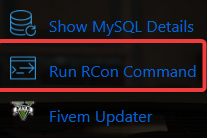
7. Type in setgroup USER_ID superadmin. Replace USER_ID with your in-game user id.
8. Run the command and wait for it to finish.
9. In-game, try any admin command such as /noclip to test if you have admin priviledges.
Did the above information not work for you?
Please click here to contact our support via a ticket.
