
 This guide will help you about the License Key on your FiveM server.
FiveM is a powerful modification framework for Grand Theft Auto V that allows players to create and join custom multiplayer servers with unique game modes, scripts, and communities. To run a FiveM server, one of the most important requirements is obtaining and configuring a FiveM License Key. This guide is designed to help both beginners and experienced server owners understand the essentials of license keys, why they are needed, and how to set them up correctly. Without a valid license key, your FiveM server won’t run properly, which can prevent players from connecting. By following this guide, you’ll be able to set up your server securely, avoid unnecessary downtime, and focus on building the community and gameplay experience you envision.
License Key Guide on your FiveM Server
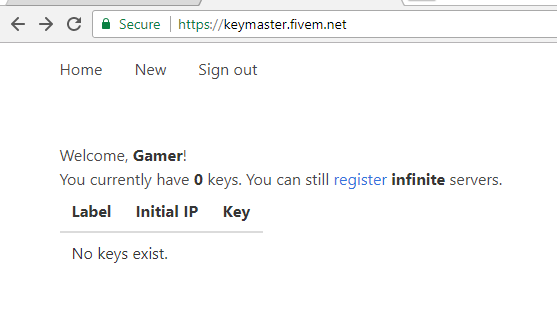
1. Go to https://keymaster.fivem.net/
2. Sign in or create a new account first if you don't have one yet.
3. Click the New button at the upper left.
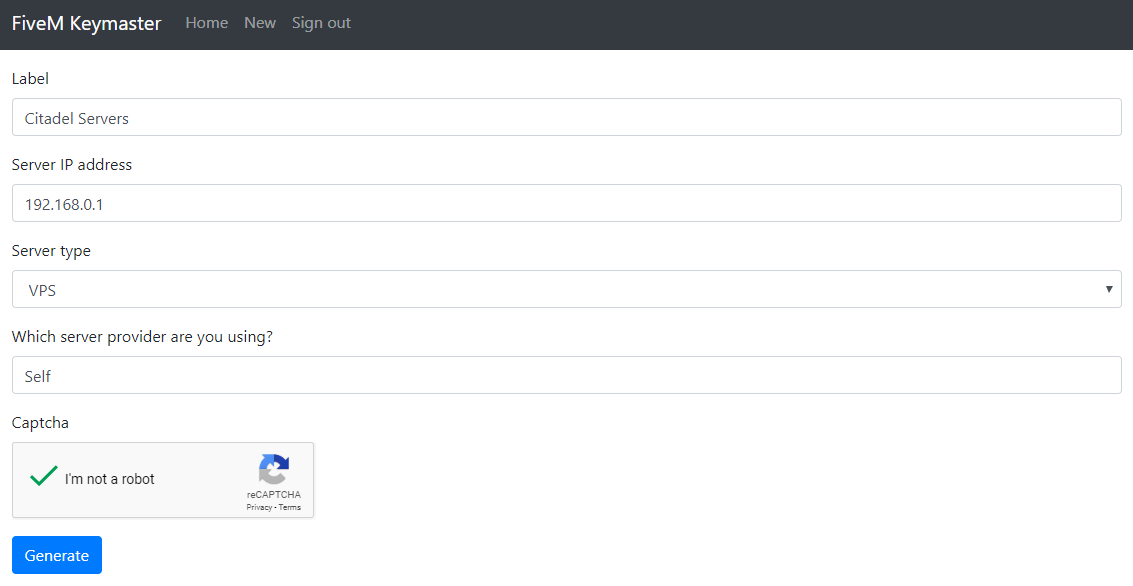
4. Specify a Label then enter your server's IP Address and make sure to select VPS for Server Type.
5. Indicate Self or Self Hosted under Which server provider are you using?.
6. Verify the Captcha.
7. Click Generate.
8. Copy the Key.
9. On your Game Panel, open Configuration Files.
10. Locate server.cfg and click Text Editor.
11. Paste the key after sv_licenseKey YourLicenseKeyGoesHereWithoutQuotes
12. Click Save and restart your server.
Did the above information not work for you?
Please click here to contact our support via a ticket.
