
 This guide will help you on How to Change the Server's Name on your FiveM Server.
Running a FiveM server is all about creating a unique experience for your community. One of the simplest but most important ways to personalize your server is by giving it a custom name. The server name is what players see in the server browser—it’s your first impression, your brand, and often the deciding factor in whether someone clicks to join. In this guide, we’ll walk through the steps to locate your configuration file, make the necessary edits, and ensure your new server name displays correctly in the FiveM server browser. With just a few minutes of setup, you can give your server a fresh identity that attracts more players and better represents your community.
Changing the Server's Name on your FiveM Server
1. Log in to your Game Control Panel and navigate to your service.
2. Before making any modifications, stop the server from running by clicking the Stop button.

3. Navigate to the Configuration Files Tab.
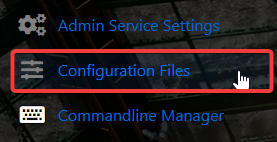
4. On the Configuration Files, look for Server.cfg files and click the Text Editor.

5. On the Text Editor, look for sv_hostname line and put your preferred server name.
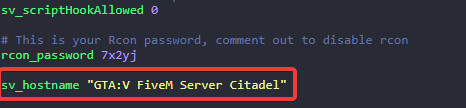
6. After editing, click the Save button to apply the changes on your server.

Did the above information not work for you?
Please click here to contact our support via a ticket.
