

This guide will help you change your map to Valguero on your ARK Survival Ascended Server.
One of the most exciting aspects of running your own ARK Survival Ascended server is the ability to customize your world. Whether you’re looking for new landscapes to explore, unique creatures to tame, or fresh challenges to overcome, switching maps can completely transform your gameplay experience. Among the many official maps available, Valguero stands out as a fan favorite thanks to its diverse biomes, massive underground Aberration zone, and wide range of resources that make survival both thrilling and rewarding. In this guide, we’ll walk you through the process of changing your server’s map to Valguero. You’ll learn the steps required to update your server settings, ensure compatibility with your mods and configurations, and get your community ready to embark on adventures in this expansive new environment. Whether you’re hosting for friends or managing a larger player base, this introduction will set the stage for a smooth transition to Valguero and help you unlock everything the map has to offer.
Changing your Map to Valguero on your ARK Survival Ascended Server
Log in to your Game Control Panel and navigate to your service.
Before making any modifications, stop the server from running by clicking the Stop button.

There are three methods for changing your map to Valguero.
Method 1. Installing via Mod Manager
Navigate to the Mod Manager Tab, look for the Valguero Map, and click the Install button on the side.

Method 2: Using a Modded Commandline
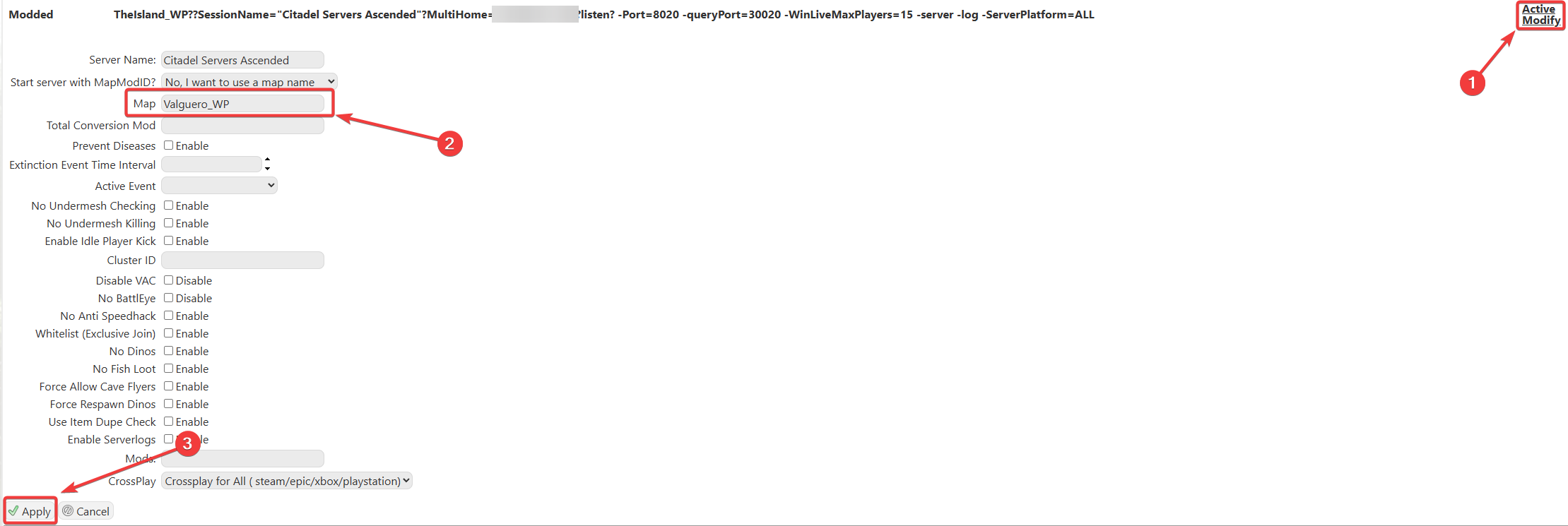
Please make sure to follow proper capitalization as they are case-sensitive.
Please click here to contact our support via a ticket.
