
This guide will help you change your map to The Center on your ARK Survival Ascended Server.
Changing your Map to The Center on your ARK Survival Ascended Server
Log in to your Game Control Panel and navigate to your service.
Before making any modifications, stop the server from running by clicking the Stop button.

There are three methods for changing your map to The Center.
Method 1. Installing via Mod Manager
Navigate to the Mod Manager Tab, look for the The Center Map, and click the Install button on the side.

There are two ways to change the map via the command-line manager.
Navigate to the Commandline Manager Tab. Click Modify on the Default Commandline option. This will display the available options, including the Map section.
Select the "The Center DLC MAP" for the Aberration map.

Method 3: Using a Modded Commandline
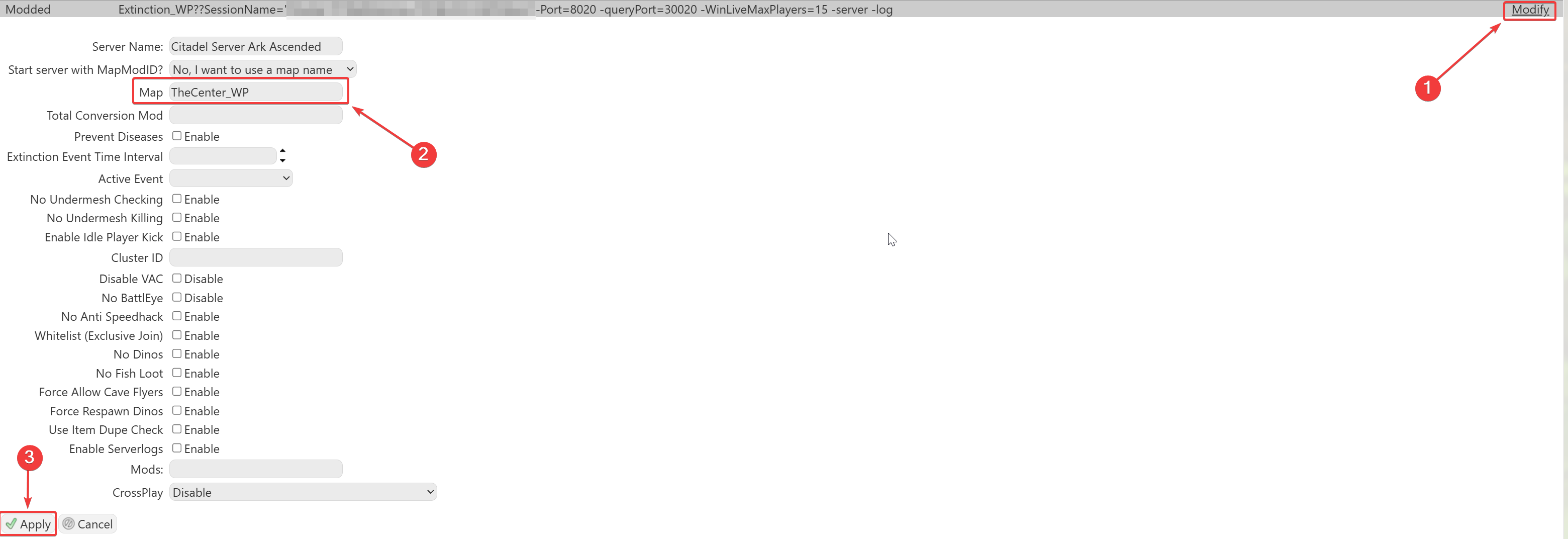
Please make sure to follow proper capitalization as they are case-sensitive.
Please click here to contact our support via a ticket.
