
This guide will help you on how to switch game version on your ARK Survival Ascended.
Managing your ARK: Survival Cloud experience often means keeping control over which game version you’re running. Whether you want to roll back to a previous build for stability, test new features in the latest update, or ensure compatibility with your community’s mods, knowing how to switch versions is essential. By the end, you’ll be confident in managing version changes without disrupting gameplay, giving you full flexibility to tailor your ARK experience to your needs.
WARNING: This will delete and remove any saved data, player data, mod data and game files
as it switches to a completely different version of the game which are not compatible with each other.
Switching Game Versions for ARK Survival Cloud
1. Log in to your Game Control Panel and navigate to your service.
2. Before making any modifications, stop the server from running by clicking the Stop button.

3. Navigate to Game Switcher Tab.
4. On the Game Switcher, click the Switch to then choose ARK: Survival Ascended. Then click the Switch button at the top.
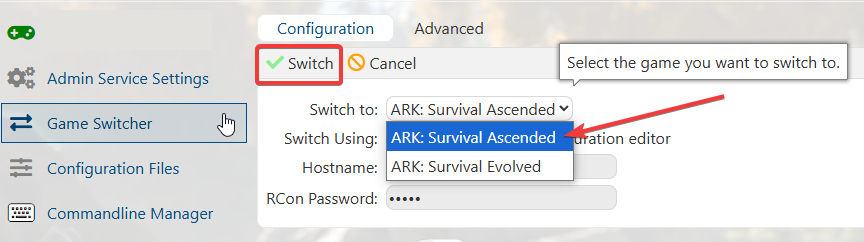
5. Wait for the process to finish, the server will then switch to your desired version, as stated ALL data is cleared and the new game is downloaded and installed in it's place.
Did the above information not work for you?
Please click here to contact our support via a ticket.
