

This guide will show you how to enable peaceful mode on your Enshrouded Server.
Click here to order your Enshrouded server with AA Game Hosting today!
Running an Enshrouded server gives you full control over how your world behaves, and one of the most popular customization options is Peaceful Mode. This mode transforms the way enemies interact with players: instead of hunting you down or ambushing your party, standard foes become pacified. You can wander through forests, gather materials, and construct elaborate bases without worrying about sudden danger. It’s important to note, however, that bosses such as the Fell Wispwyvern remain hostile even in Peaceful Mode. This ensures that while the general world is calm, major encounters still provide a challenge.
Enabling Peaceful Mode on your Enshrouded Server
1. Log in to your Game Control Panel and navigate to your service.
2. Before making any modifications, stop the server from running by clicking the Stop button.

3. Go to the Configuration Files Tab.
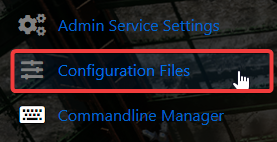
4. On the Configuration Files, look for enshrouded_server.json file and click the Text Editor beside the Config Editor.

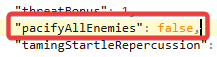
5. On the Config Editor, Look for pacifyAllEnemies line and enable it by changing the value to TRUE.

Please click here to contact our support via a ticket.
