

This guide will show you how to disable weapon durability on your Enshrouded Server.
Click here to order your Enshrouded server with AA Game Hosting today!
Running your own Enshrouded server gives you the freedom to tailor the survival experience to your liking. One of the most common tweaks players ask for is disabling weapon durability. By default, weapons in Enshrouded wear down over time, requiring repairs or replacements. While this mechanic adds realism and challenge, it can also feel tedious for groups who prefer focusing on exploration, combat, or building rather than constant equipment maintenance. Disabling weapon durability on your server ensures that your gear remains intact indefinitely, allowing players to fight, craft, and adventure without worrying about their favorite sword or bow breaking mid-battle. This adjustment is especially popular among roleplay communities, PvP-focused servers, or casual groups who want a smoother gameplay loop. By the end, you’ll have a clear path to customizing your Enshrouded server so that weapons last forever, giving your community more freedom to enjoy the game the way they want.
Disabling Weapon Durability on your Enshrouded Server
1. Log in to your Game Control Panel and navigate to your service.
2. Before making any modifications, stop the server from running by clicking the Stop button.

3. Go to the Configuration Files Tab.
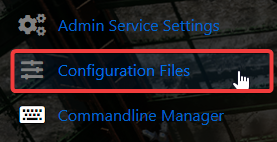
4. On the Configuration Files, look for enshrouded_server.json file and click the Text Editor beside the Config Editor.

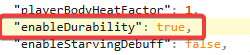
5. On the Config Editor, Look for enabledurability line and set the value to false to disable it.

Please click here to contact our support via a ticket.
