
This guide will help you with how to troubleshoot an ARK: Ascended Server That Shows Online but Won’t Allow Connections
When your ARK: Ascended server appears in the in‑game server list but refuses to let players join, it usually means the server is online but failing one of the key validation checks required for connections. This can happen for several reasons: incorrect browser filters, a mismatched password setting, a mod failing to load, or the server not fully completing its startup sequence even though it shows as available. Because the server is visible, you know it’s broadcasting correctly; the issue lies in what happens after players attempt to connect. This guide walks you through the most common causes of join failures, how to verify whether the server has actually finished initializing, and the steps you can take to restore proper connectivity so players can join without errors.
Resolving Join Failures When Your ARK: Ascended Server Shows in the Browser
1. Log in to your Game Control Panel and navigate to your service.
2. Start the server and launch the game.

3. Once the server becomes visible in the Server List, check its status. If the server is greyed out, proceed with the guide.
Go back to the Game Control Panel and select “Steam Update.”
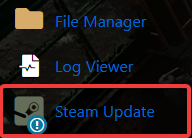
4. After the update has finished, start the server. It should now display as active instead of greyed out, allowing successful connections.
Please click here to contact our support via a ticket.
