

This guide will help you with Enabling Cheat Commands on your Unturned Server
Power Up Your Unturned Server Today with AA Game Hosting
Cheat commands are an essential tool for server owners who want full control over gameplay, testing, and administration in Unturned. Whether you’re adjusting the time of day, spawning items, or managing players, enabling cheats gives you access to powerful commands that make server management faster and more flexible. This introduction walks you through how cheats work, why they’re useful, and what you need to do to activate them on your Unturned server so you can start using admin‑level commands right away.
How to Turn On Cheats on your Unturned Server
1. Log in to your Game Control Panel and navigate to your service.
2. Before making any modifications, stop the server from running by clicking the Stop button.

3. Navigate to the Configuration Files Tab to continue.
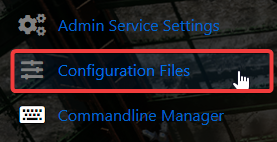
4. In the Configuration Files area, you’ll see the Servers\server -sv\server\Commands.dat file, which stores your general server config. Click the Config Editor to begin editing.

5. Within the Config Editor, find the Cheats field and enable it.
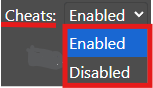
6. When you’re finished configuring the difficulty, click the Save button to commit the changes to your server.

If you want to modify the server name through the file itself rather than the UI, select the Text Editor next to the Config Editor and apply your changes.
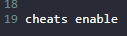
This guarantees that your custom additions, like mods or scenario tweaks, are saved and won’t be replaced by the default Config Editor settings.
Did the above information not work for you?
Please click here to contact our support via a ticket.
