

This guide will help you set up and configure your Unturned Server
Power Up Your Unturned Server Today with AA Game Hosting
Setting up your Unturned server is the first step toward creating a stable, customizable world for you and your players. Whether you're hosting a private survival experience or building a large multiplayer community, understanding the setup process ensures your server runs smoothly from day one. This guide walks you through the essential steps from initial installation to core configuration so you can launch a reliable Unturned server tailored to your gameplay style and hosting needs.
Configuring your Unturned Server
1. Log in to your Game Control Panel and navigate to your service.
2. Before making any modifications, stop the server from running by clicking the Stop button.

3. Navigate to the Commandline Manager Tab to continue.
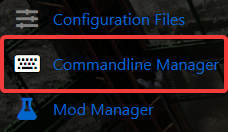
4. Within the Commandline Manager, you can set your preferred Gamemode, modify PVE/PVP settings, and update the world name.

When you’re finished configuring the options, click Apply to update your server.
Default Options
Unturned includes several built‑in maps you can use by default. You can keep one of these or replace it with a custom map. The default map options are:
arena
pei
washington
yukon
Gamemode Options
The Gamemode setting defines the overall difficulty of your server. Each option adjusts survival intensity, loot scarcity, and player challenge:
bambi — Easy
normal — Standard
hardcore — Hard
gold — Extreme
You can select your preferred Gamemode from the dropdown menu.
PVP/PVE Setting
This setting determines how players interact with each other:
pvp — Players can fight and damage each other
pve — Players cannot harm each other; combat is only against the environment
Please click here to contact our support via a ticket.
