This guide will help you How to Customize Raid Times in SCUM Server
Click to Start Your SCUM Server with AA Game Hosting
Customizing raid times on your SCUM server gives you full control over when players are allowed to raid bases, helping you shape the pace, fairness, and intensity of your server’s PvP experience. Whether you want strict raid windows for structured warfare or relaxed settings that allow constant conflict, adjusting raid time rules lets you tailor gameplay to your community’s preferences. By configuring raid time settings, server owners can define specific hours when base damage is enabled, protect players during off-peak times, and create a more balanced environment for both casual and competitive play. These adjustments can significantly impact player behavior, encouraging more strategic planning and fairer engagement across the server. In this guide, you’ll learn how to customize raid times on your SCUM server, where to locate the relevant settings, and how to apply them effectively to create the type of survival experience you want.
Configuring RAID Time Settings on a SCUM Server
1. Log in to your Game Control Panel and navigate to your service.
2. Before making any modifications, stop the server from running by clicking the Stop button.
3. Navigate to the Configuration Files Tab to continue.

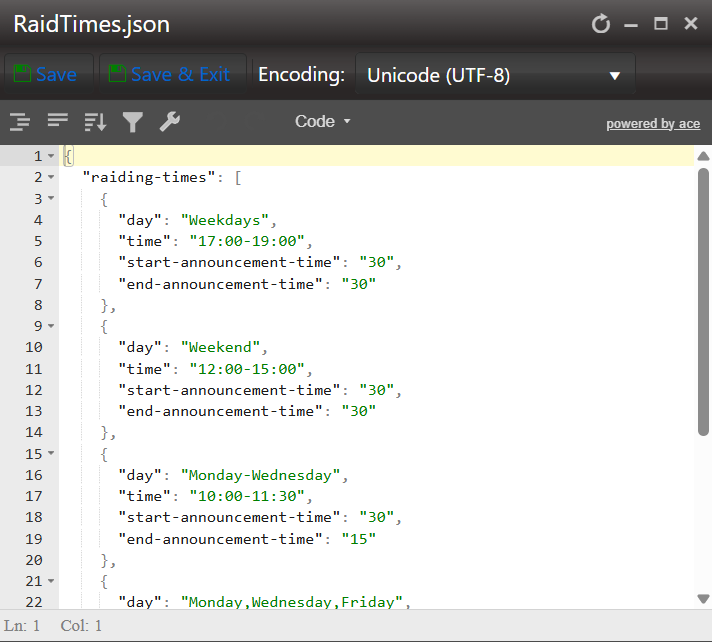
4. In the Configuration Files section, open the RaidTimes.json file and select the Text Editor option.

5. In the file, configure your raid times according to your preferred schedule.