

This guide will help you How to Customize the Economy on your SCUM Server
Click to Start Your SCUM Server with AA Game Hosting
Customizing the economy on your SCUM server allows you to create a more balanced, rewarding, and immersive survival experience for your players. Whether you want to increase the availability of weapons and supplies, adjust trader pricing, or create a hardcore survival environment with limited resources, SCUM’s economy override system gives server owners full control over how loot and trading work. By modifying economy settings, you can fine-tune item spawn rates, control trader inventories, and shape the overall progression of your server to match your community’s playstyle. From PvP-focused worlds with abundant gear to realistic survival servers where every bullet counts, economy customization is one of the most powerful tools available to SCUM administrators. In this guide, you’ll learn how to configure economy overrides on your SCUM server, where to find the necessary files, and how to safely apply changes to create the gameplay experience you want.
Configuring the Economy Override System on a SCUM Server
1. Log in to your Game Control Panel and navigate to your service.
2. Before making any modifications, stop the server from running by clicking the Stop button.
3. Navigate to the Configuration Files Tab to continue.

4. In the Configuration Files section, open the EconomyOverride.json file and select the Text Editor option.

5. In the file, configure your Economy Override settings based on your server preferences. Review the descriptions and available values for each variable below to better understand how they affect your server’s economy and gameplay experience.
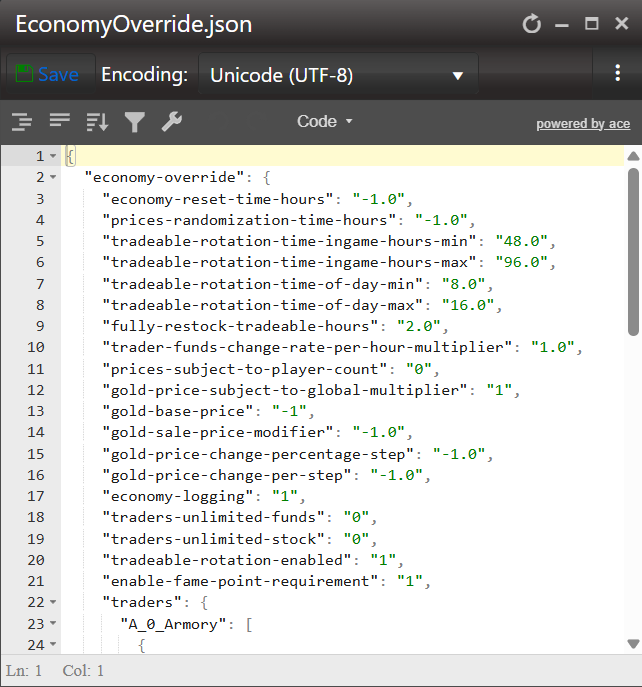
6. Once you have finished editing the file, click Save to apply your changes.

Start your server to load the new economy settings and bring your customized gameplay experience to life.
Economy Override Section
| Variable Name | Description | Possible Settings |
|---|---|---|
| enable-economy | Enable or disable the economy system & trader spawning. | 1 to enable or 0 to disable |
| economy-reset-time-hours | How many real-life hours does it take for the trader to reset their funds to 0 & any stocked items to their set default values? | Any number that translates to hours, for example, 2.0 Default = -1.0 |
| prices-randomization-time-hours | How many real-life hours does it take to randomize prices at a trader? If the value is less than 0, the trader will never randomize prices. | Any number that translates to hours, for example, 2.0 Default = -1.0 |
| fully-restock-tradeable-hours | How many real-life hours does it take to fully restock the tradeable amount in the trader's stock? If the value is less than 0, the trader will never restock. | Any number that translates to hours, for example, 2.0 Default = 2.0 |
| trader-funds-change-rate-per-hour-multiplier | How fast traders will refill their available funds in real-life hours. | Any number that translates to hours, for example, 2.0 Default = 1.0 |
| traders-unlimited-funds | If set to 1 (enabled), the trader's funds will never deplete when a player sells tradeable items to them. | 1 to enable or 0 to disable |
| limited-vehicles | Limits the number of vehicles that can be purchased in total in the world for purchase. Purchasable vehicles are counted differently from spawned vehicles. | Any number that translates to the limit on vehicle amount, for example, 10 |
Traders Section
Please take note of the following template when adding new entries to the Economy Override file:
{"tradeable-code" : "itemspawnname", "base-purchase-price" : "-1", "base-sell-price" : "-1", "delta-price" : "-1.0", "can-be-purchased" : "default"},
| Variable Name | Description | Possible Settings |
|---|---|---|
"tradeable-code": "itemspawnname" |
Specify the item you wish to control, replacing "itemspawnname" with the item name. Available item names can be found in Item IDs. | Example: "tradeable-code": "BP_Frag_Grenade" |
"base-purchase-price": "-1" |
Specify the base purchase price of the specified item. | Any numerical value Default is -1, which will set the value to the default price |
"base-sell-price": "-1" |
Specify the base selling price of the specified item. | Any numerical value Default is -1, which will set the value to the default price |
"delta-price": "-1.0" |
Multiplier to the base price, which determines the increase or decrease of the price displayed in the trader's store. The default of -1 means the delta is determined by random chance. If the edited value is 0 or more, the delta will never change, even after price randomization. | Any numerical value Default is -1, which means the delta is determined by random chance |
"can-be-purchased": "default" |
Specify if the item can or cannot be purchased from the trader. | default, true or false "default" gives the item vanilla availability, "true" is enabled & "false" is disabled. |
Did the above information not work for you?
Please click here to contact our support via a ticket.
