

This guide will help you with how to Edit Map Rotation Settings on a KF2 Server
Host Killing Floor 2 with AA Game Hosting
Editing the map rotation on your Killing Floor 2 server is one of the simplest ways to shape the experience for your players. Whether you want a tight loop of your favorite arenas, a curated progression of difficulty, or a fully custom rotation featuring Steam Workshop maps, adjusting these settings gives you full control over how each session flows. In this guide, you’ll learn exactly how to access and modify the map rotation settings in your KF2 server configuration, understand what each option does, and apply changes safely so your server runs the way you want.
Configuring Map Cycles on a Killing Floor 2 Dedicated Server
1. Log in to your Game Control Panel and navigate to your service.
2. Before making any modifications, stop the server from running by clicking the Stop button.
3. Navigate to the Configuration Files Tab to continue.

4. Find System\KillingFloor.ini in the Configuration Files list and select Config Editor to begin editing.
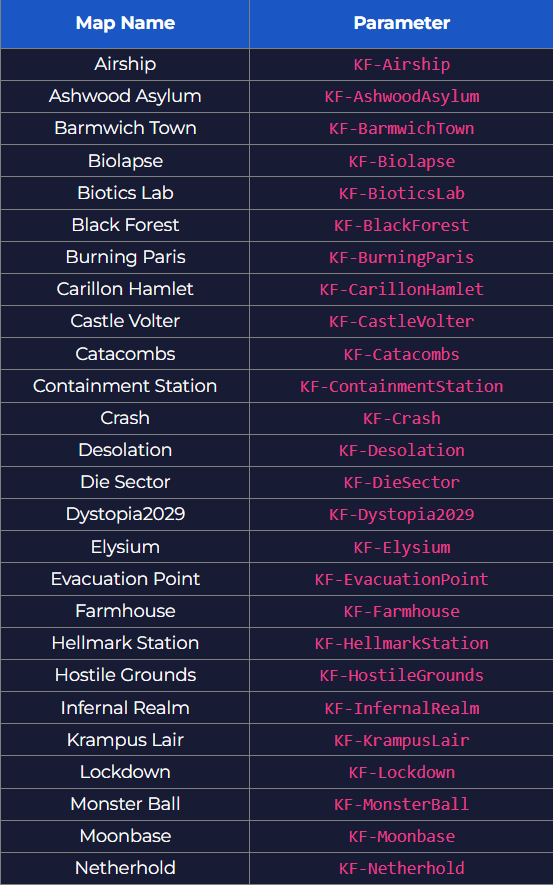
5. In the Config Editor, find the GameMapCycles field and set it to the game map you want to use.
6. Once you finish editing, press the Save button to update the configuration.

Did the above information not work for you?
Please click here to contact our support via a ticket.
