

This guide will help you connect to your Mount & Blade II: Bannerlord Server
Ready to Rule? Spin Up Your Bannerlord Server Now
Connecting to your Mount & Blade II: Bannerlord server is the final step before you and your players can jump into battle. Whether you're hosting large‑scale multiplayer matches or running a private server for friends, knowing how to join your server reliably is essential. The process is straightforward, but it helps to understand where to find your server, how to enter connection details, and what to do if it doesn’t appear in the in‑game browser. In this guide, you’ll learn the different ways to connect through the in‑game server list, direct IP connection, and common troubleshooting steps so you can get into the action quickly and without hassle.
Connecting to Your Mount & Blade II: Bannerlord Server
1. You need to open your Mount and Blade II game client.
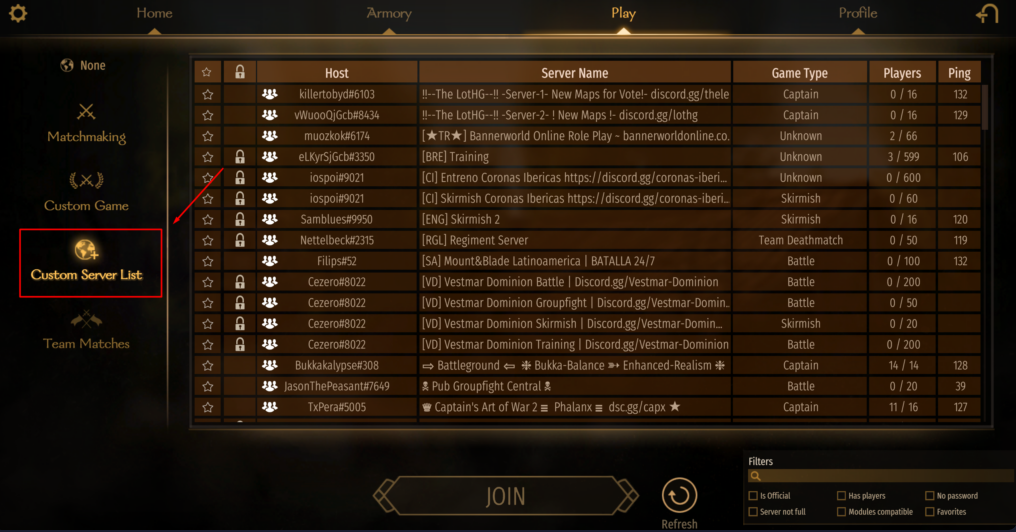
2. Navigate to "Custom List Server."
3. Search your server name using the server name search tab in the right corner of the game
4. After searching your server name, click "Join" to connect to your Bannerlord server.
Please refer to the image below.
If you encountered issues during the process,
Please click here to send a ticket to our team.
