

This guide will show how to set custom day settings on your DayZ server.
Click here to order your DayZ server with AA Game Hosting today!
One of the most immersive aspects of DayZ is its dynamic day and night cycle, which can dramatically affect gameplay, visibility, and player strategy. But what if you want longer days for exploration or shorter nights to reduce downtime? Whether you're hosting a PvP-heavy server or crafting a survival experience tailored to your community, customizing the day time settings gives you control over the rhythm of the world. In this guide, you'll learn how to fine-tune the day/night cycle on your DayZ server from adjusting sunrise and sunset times to modifying the speed at which time passes. With just a few tweaks to your server configuration files, you can create a unique atmosphere that matches your vision and enhances player engagement.
Setting Custom Day Settings on your DayZ Server
1. Log in to your Game Control Panel and navigate to your service.
2. Before making any modifications, stop the server from running by clicking the Stop button.

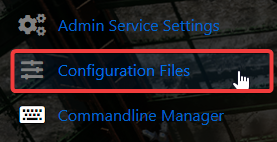
3. Go to Configuration Files.
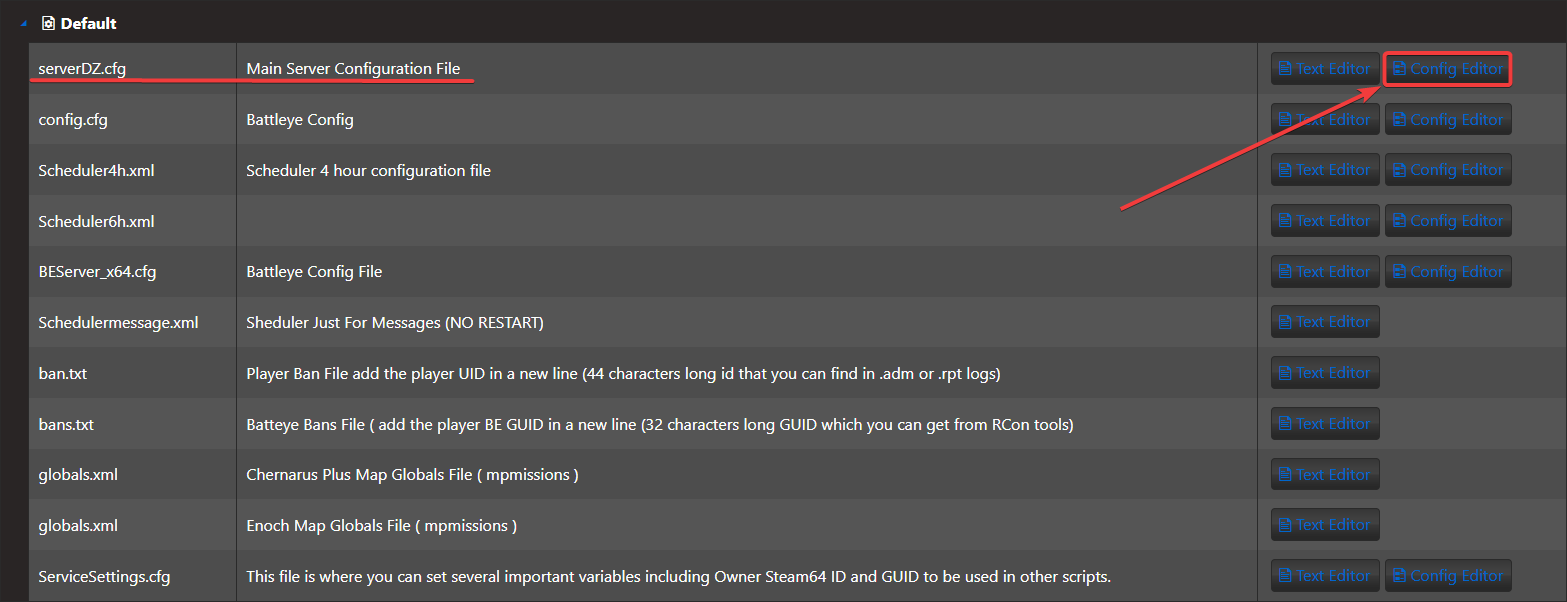
4. On the Configuration Files, look for ServerDZ.cfg and click the Config Editor.
5. On the Config Editor, look for Time Acceleration and modify it based on your preferences.
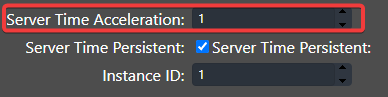
Accelerated Time (value 0-24). This is a time multiplier for in-game time. In this case time would move 24 times faster than normal, an entire day would pass in one hour.
6. After editing, click the Save button to apply the changes on your server.

Did the above information not work for you?
Please click here to contact our support via a ticket.
