
This guide will help you with how to perform a Complete Save Reset on your The Isle Server
Launch Your Isle Server Today with AA Game Hosting
Resetting your The Isle server save is an essential maintenance task that helps you clear corrupted data, start a fresh world, or prepare your server for a new season of gameplay. Whether you're troubleshooting issues, wiping player progress, or simply giving your community a clean slate, performing a full save reset ensures your server runs smoothly and consistently. This guide walks you through the process step by step, explaining what each action does and how to complete the reset safely without disrupting your server configuration.
1. Log in to your Game Control Panel and navigate to your service.
2. Before making any modifications, stop the server from running by clicking the Stop button.

3. Navigate to the File Manager Tab to continue.
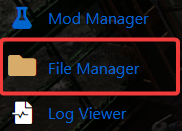
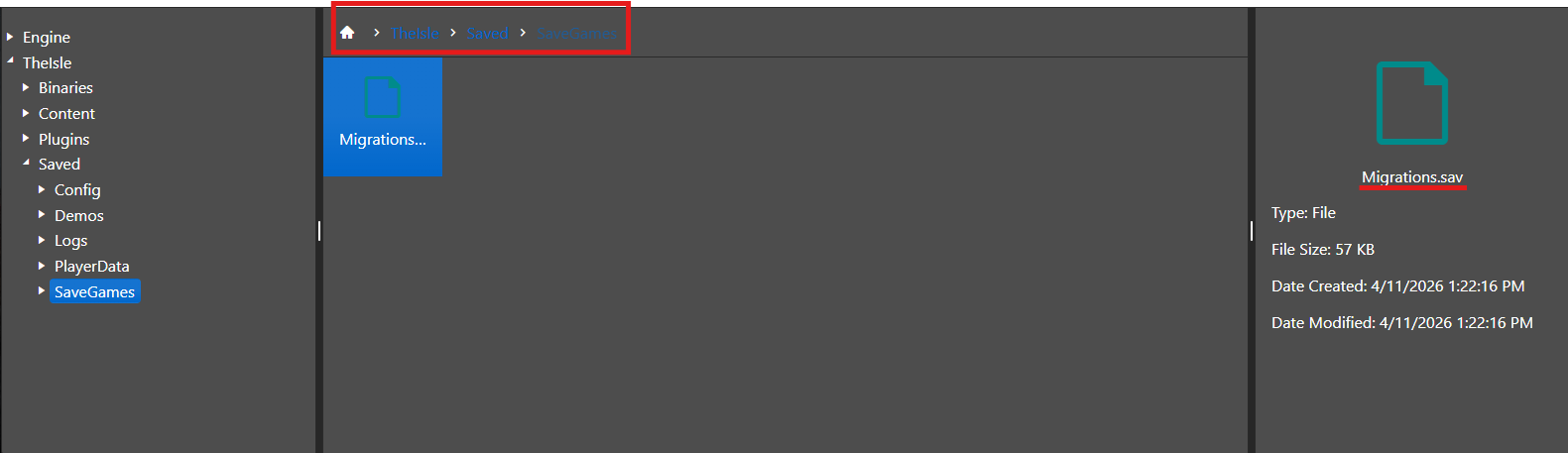
4. From the File Manager tab, access the /TheIsle/Saved/SaveGames directory.
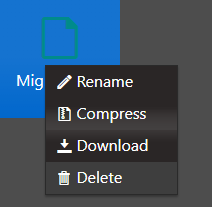
5. Right‑click the item, select Delete, and approve the confirmation dialog.
6. With the old save removed, start your server to create a new world.

Did the above information not work for you?
Please click here to contact our support via a ticket.
