This guide will show you how to enable PvE Mode on your ARK Survival Evolved Server
Player‑vs‑Environment (PvE) mode is ideal for ARK: Survival Evolved servers focused on exploration, building, and cooperative gameplay. By disabling player‑vs‑player combat, you create a safer and more community‑friendly environment where players can focus on taming creatures, constructing bases, and progressing through the world without the risk of other survivors attacking them. Enabling PvE mode only requires a quick configuration change, and once applied, your server will immediately shift to a non‑competitive experience. This guide walks you through how to activate PvE mode on your ARK SE server so your players can enjoy a peaceful and collaborative adventure.
Configuring Your ARK SE Server for PvE Gameplay
1. Log in to your Game Panel.
2. Before making changes, make sure the server is stopped.

3. Navigate to Commandline Manager.
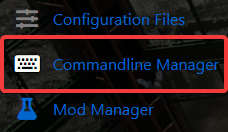
4. On the commandline manager, click Modify on the current and active commandline.
5. Locate the PvE Server option and check the box to enable it.

6. After enabling the PvE Server option, click the Apply button to save your changes in the Commandline Manager.